AI Cartoon PortraitNEW
Pick a cartoon style and generate avatars from your photo in one go
Loading the tool…
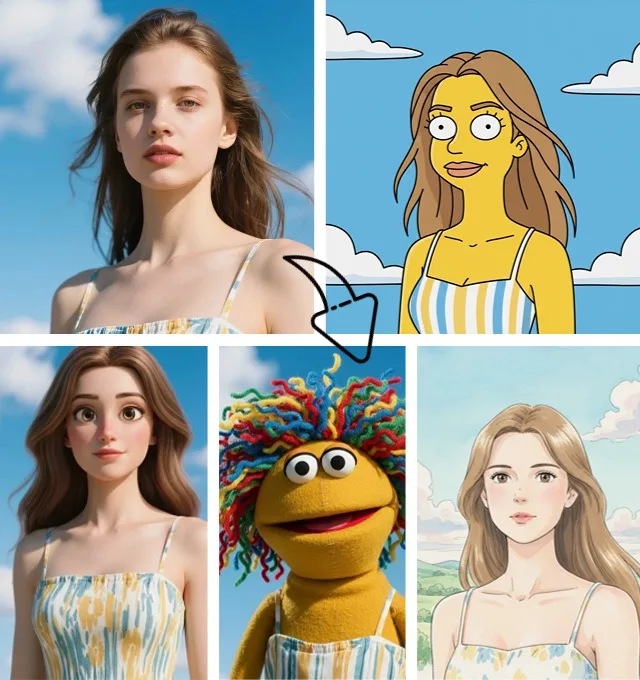
Turn a photo into a cartoon portrait with this AI cartoon portrait generator. Upload a person, a pet or a group photo, pick a cartoon style you like, and the image model configured for this site does the rest, returning a cartoon portrait in tens of seconds. You can generate 1, 2 or 4 images at once and keep the one you like best.
Ten styles are available, including 3D cartoon, Pixar, Ghibli, Japanese anime, Simpsons, classic American cartoon, puppet, Funko figure, toy pet and traditional Chinese gongbi. Choose a square avatar, a 3:2 landscape or a 2:3 portrait canvas, then download the result as JPG or PNG. This tool has no local rendering mode and asks you to choose no model: it uses the image model the site administrator configured, so quality and speed depend on that endpoint.
Why use AI Cartoon Portrait on AllFreeTool?
10 Cartoon Styles
3D cartoon, Pixar, Ghibli, Japanese anime, Simpsons, gongbi and more, switched in one click.
Cloud Model Rendering
Generated by the image model configured for this site, so it uses no local GPU and works on a phone.
Canvas and Count
Pick a square avatar, a landscape or a portrait canvas, and request 1, 2 or 4 images.
JPG or PNG
Download each generated image, and set the JPG quality yourself.
How to use AI Cartoon Portrait
Upload Photo
Choose a JPG, PNG or WebP file up to 10MB; a clear front-facing portrait works best.
Choose Style and Count
Pick a cartoon style, then the canvas and the number of images, and click Generate.
Generate and Download
Images are generated one by one; download the ones you like as JPG or PNG.
Common questions
Why does it say no image model has been configured yet?+
It means the site administrator has not yet entered and enabled an image model in the model settings. This tool depends entirely on that endpoint, so it cannot produce an image until it is set up. Other AI tools on the site can still use their browser-based local mode.
Where are my photos uploaded?+
They are sent to the image model provider configured for this site, whose name is shown at the top of the page, and that provider performs the cartoon conversion. Our server only forwards the file and never stores your photo. If you prefer not to upload anything, use one of the tools that process images locally.
Will the generated portrait still look like me?+
A generative model repaints the whole photo. It keeps the main features such as hairstyle, face shape, glasses and facial hair, but exaggerates or simplifies the facial features, so the result differs from you in detail. A front-facing photo with even lighting and no obstruction gives the best outcome, while side profiles and group photos tend to distort.
How many images can I generate and how long does it take?+
You can choose 1, 2 or 4, and they are generated one after another. Each one usually takes from a few seconds up to a minute, depending on the provider's queue and speed. You can download them individually afterwards, or export again in a different format.
Why does it say I am generating too fast?+
To keep costs under control, cloud generation is limited to 10 requests per minute for each IP address. Clicking Generate several times in a row easily hits that limit, so wait a minute and try again. Choosing 4 images in one run consumes 4 of those requests.
What are the sample images on the style cards?+
Each style card shows a real example portrait for that style, and it only conveys the general look of the style. It does not change with the photo you upload and it is not a preview of your result. The real cartoon portrait is repainted by the model from your photo and the style you picked, so it will differ from the sample.